BIOS, Operating Systems, and Customizations
Beyond the robust hardware and certifications, the true intelligence and usability of Acura's industrial computers lie in their software and system foundations.
This section will demystify the BIOS, explore the operating system options, and delve into the extensive software customization capabilities that Acura offers, all designed to enhance performance, security, and user experience in demanding industrial environments.
1. BIOS (Basic Input/Output System): The Computer's First Instructions
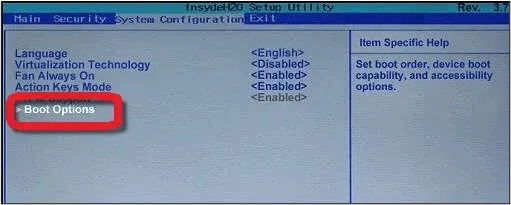
Think of the BIOS (Basic Input/Output System) as the computer's very first set of instructions, the foundational software that wakes up the hardware components when you press the power button. It's responsible for performing a quick check of the system (like making sure the memory and processor are working) and then handing control over to the operating system.
What it is: The BIOS is firmware, a type of software permanently stored on a small chip on the computer's motherboard. It's the bridge between the hardware and the operating system.
Acura's Approach (AMI EFI BIOS): Acura systems typically use AMI EFI BIOS. EFI (Extensible Firmware Interface) is a modern type of BIOS that offers more advanced features, faster boot times, and better security than older BIOS versions.
Why it matters: A well-configured and stable BIOS is crucial for the reliable operation of an industrial computer. It ensures compatibility between hardware components and allows for specific settings that optimize performance for industrial applications. Our engineers meticulously manage BIOS configurations to ensure maximum stability and compatibility with diverse industrial software and peripherals.
2. Operating Systems: The User's Control Center
The Operating System (OS) is the main software that manages all the hardware and software on a computer. It allows you to interact with the computer, run programs, and manage files. Without an OS, a computer is just a collection of parts.
Acura offers flexibility in operating system choices to meet various customer needs:
Windows (Windows 10 Pro, Windows 11 Pro): These are standard, widely recognized operating systems that offer broad compatibility with commercial software and a familiar user interface. They are suitable for many industrial applications where a full-featured desktop environment is preferred.
Linux: For customers requiring open-source flexibility, specific industrial control applications, or enhanced security features, Linux is a powerful and customizable alternative. Acura ensures compatibility and support for Linux distributions on its hardware.
Windows 10/11 IoT Version: The Industrial Advantage
This is where Acura truly shines in its OS offering, particularly for industrial deployments.
What it is: The "IoT" (Internet of Things) version of Windows 10 or Windows 11 is a specialized embedded operating system. Unlike the standard Windows versions you find on consumer laptops, the IoT version is specifically designed for dedicated devices and industrial equipment.
No "Garbage" (Bloatware): A major benefit is that the Windows IoT version comes without any unnecessary software, advertisements, or consumer-focused features that can clutter a standard Windows installation. This means a cleaner, leaner, and more efficient operating environment, crucial for dedicated industrial tools.
Enhanced Security: The IoT version is optimized for security. It focuses on delivering essential security patches in the background, without forcing frequent, disruptive restarts. This ensures the system remains secure without interrupting critical operations, a common pain point with standard Windows updates.
Optimized Performance: By stripping away non-essential components, the IoT version utilizes fewer system resources, contributing to more stable and predictable performance, especially important for real-time industrial applications.
Customization for Equipment: Acura customizes the Windows IoT version for each motherboard, ensuring optimal performance and stability.
3. Software Customizations: Tailoring the User Experience and Security
Beyond the choice of operating system, Acura offers extensive software customization capabilities that transform a powerful computer into a truly integrated and secure tool for the customer. These customizations are often provided free of cost, adding significant value.
Custom Boot-Up Logo:
What it is: Instead of the standard Windows or manufacturer logo appearing when the computer starts up, Acura can integrate the customer's own company logo.
Why it matters: This seemingly small detail significantly enhances brand identity and reinforces the feeling that the Acura computer is a fully integrated part of the customer's proprietary system or tool. It creates a seamless and professional user experience from the moment the device powers on.
Custom Colors (Physical & Digital):
What it is: While primarily a physical customization, it ties into the overall user experience. Acura can provide custom colors for the computer unit itself and even for accompanying accessories like Pelican cases.
Why it matters: This allows customers to easily recognize and differentiate their equipment in the field, especially when multiple companies are operating on a rig. It adds a layer of visual branding and operational efficiency.
Pre-Loaded Software Images:
What it is: For customers who have a specific software configuration or proprietary application they use, Acura offers to pre-load a custom software "image" onto new batches of computers. The customer configures one unit, sends that image to Acura, and we securely store it on our servers.
Why it matters: This is a massive time-saver for customers, especially large fleets like those of NOV or Schlumberger. Instead of manually configuring each computer, they receive units that are ready to deploy "out-of-the-box" with their exact software setup, eliminating configuration time and ensuring consistency across their fleet. It means "no hardware change, no software change" for the customer.
Software Shells and Restricted Access:
What it is: Acura can implement a "shell" on the front of the operating system. This shell acts as a custom user interface that restricts what the operator can access. Instead of seeing the full Windows desktop, the operator only sees and can use certain pre-approved programs.
Why it matters: This is a critical security feature. It prevents unauthorized users from accessing the underlying Windows operating system, making changes, installing unapproved software (e.g., from a USB stick), or compromising the system's integrity or data safety. It ensures that the computer functions purely as a dedicated industrial tool.
Screen Locking & Brightness Control:
What it is: Acura can integrate specific controls for features like screen locking or brightness directly onto the main screen interface, bypassing the need to navigate through Windows settings.
Why it matters: This simplifies operation for field personnel, allowing quick adjustments without leaving their primary application, enhancing usability and efficiency in dynamic environments.
Security Patches in Background (IoT Version):
What it is: As mentioned with the Windows IoT version, security updates are applied automatically in the background without requiring the computer to restart.
Why it matters: This ensures continuous operation of critical industrial processes, preventing downtime caused by unexpected reboots for updates. It maintains system security without interrupting productivity.
Acura's comprehensive approach to software and system customization ensures that our industrial computers are not just powerful hardware, but highly integrated, secure, and user-friendly solutions that seamlessly fit into our customers' unique operational workflows.
We aim to be an indispensable part of their team, taking away their pain points and delivering solutions that truly empower their operations.
There are no comments for now.
to be the first to leave a comment.